Kitchen timesheet: staff clock in and out from their phone
The new "Timesheet" section: cooks clock in and out from their phone, the chef sees the hours of the whole team day by day and corrects times — every correction stays in the history.
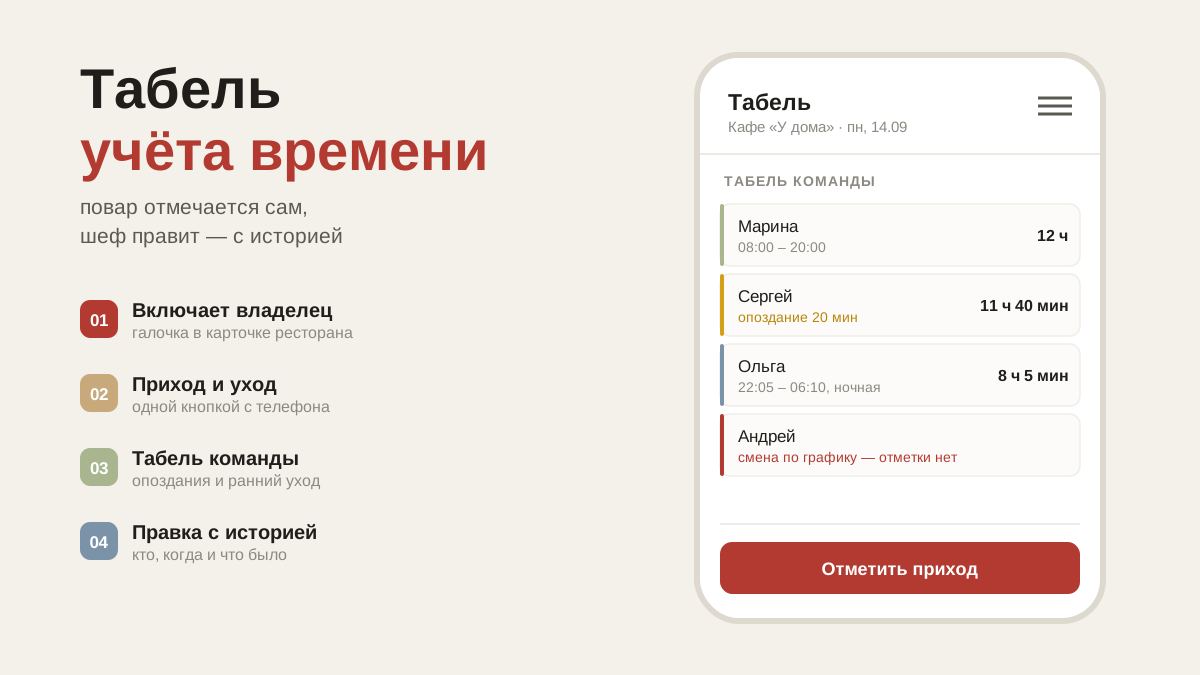
Who came in when and who left when — in a kitchen that usually lives in a notebook by the door or in the chef's memory. And an argument like "I was here at eight" has nothing to settle it. Now there is a "Timesheet" section for that.
How to turn it on
The owner or the manager turns the timesheet on: "Restaurant card" → the "Timesheet" checkbox. Until it is ticked, nobody has the section — the "Clock in" button will not appear for your cooks on its own.
The same checkbox turns it off. The records are not erased: turn it back on and everything is still there.
Cooks: two buttons
Came in for the shift — open "Timesheet" and press "Clock in". Leaving — "Clock out". The time is set automatically, there is nothing to type in.
Night shifts are counted correctly: in at 22:00, out at six in the morning — that makes eight hours.
Below is "My hours this month": every day, in, out and how long it came to. A cook does not see anyone else's hours.
The chef: team timesheet
The chef, sous chef, manager and owner see the timesheet for the whole team — day by day, with arrows to go back. Each person has their times and hours, with marks next to them:
- late and left early — by how many minutes;
- overtime — stayed after the end of the shift;
- scheduled shift — no clock-in — was on the schedule and did not clock in;
- no shift in the schedule — clocked in on a day with no shift;
- no clock-out — forgot to press "Clock out".
Lateness, leaving early and no-shows are counted against the shift schedule — from the start and the end of the shift. The shift schedule is still in development — until it opens, the timesheet only counts hours.
Corrections — with a history
Forgot to clock in — the chef corrects the time: tap the person in the timesheet, set in and out, save. The history keeps who made the correction, when, and what it was before. Nobody can quietly rewrite someone else's hours.
Staff without the app
Not everyone in the kitchen has the app, but everyone should be in the timesheet. Such a person is added in "Team": the "Add without the app" button, a name and a role. They appear on the schedule and in the timesheet straight away, and the chef marks their arrival and departure with the "Arrived" and "Left" buttons right in the team timesheet.
Once they install the app, their card in "Team" has "Give access". The chef sends them a link; with it the person enters a phone number and a password and carries on with their own record — shifts and hours stay where they are. If they have already signed up on their own, they sign in and open the same link, and everything the chef set up moves to their account.
App version — v239. You can see it at the bottom of your profile: it tells you whether your phone has updated yet.