A supplier price list: uploading, archive, telling the city
Your price list is seen by kitchens across the city, including ones you don't work with yet. How to upload it from a file, what to archive, and why updating a price list doesn't spam the feed.
Why publish a price list
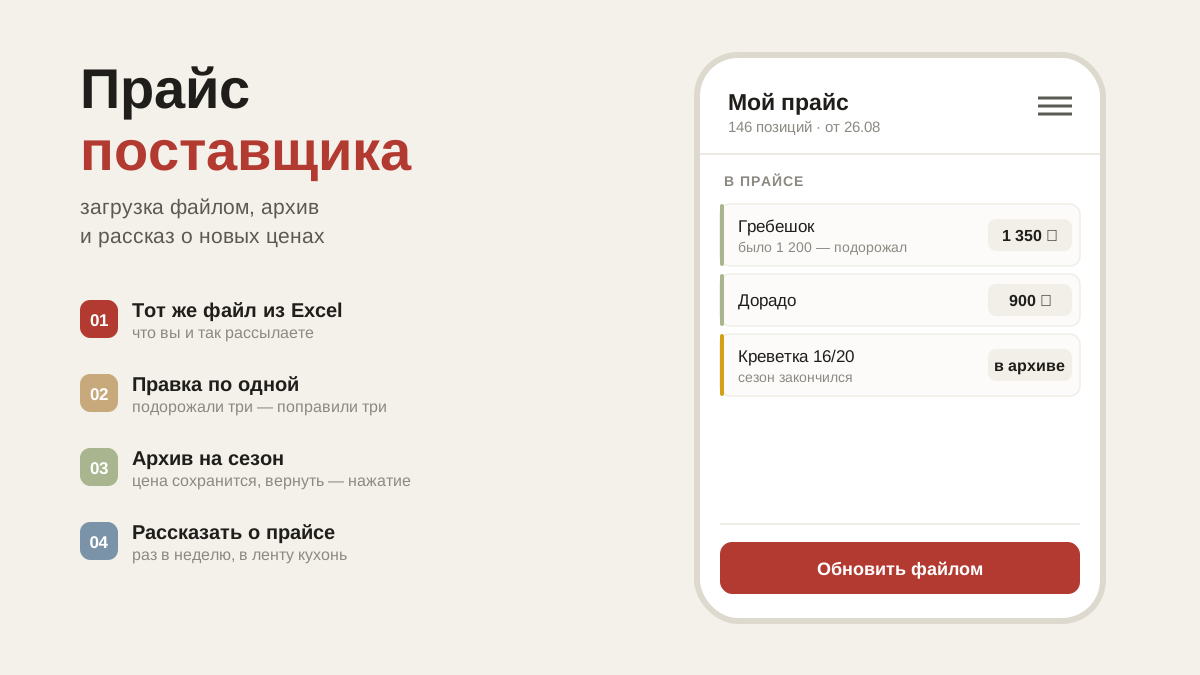
A price list in the app is seen by kitchens in your city — including ones you don't work with yet. For a kitchen it is a way to find who can supply what their current supplier doesn't carry. For you it is a shop window that works without phone calls.
Next to your price the kitchen sees its own current one: where yours is cheaper, it shows in green. If you really are cheaper, that is a better argument than any letter of introduction.
How to upload it
Menu → "My price list". Two ways: upload an Excel file, or add items one at a time.
On upload the app finds the columns itself — name, price, unit, item code — and shows what it understood before publishing. You can name the header row however you like and move the columns around; the file is read even if there is no header at all, and section rows like "Vegetables" and "Fruit" are skipped. A price given as a range ("397-697") is taken at the lower end.
A sample file. The "Download a sample file" button gives you a ready Excel with the right columns and an example of how to fill it in.
A new file means a new version of the price list
Items that aren't in the new file stop counting as available, but the old prices are kept. Individual items can be edited at any time with the pencil on the row.
Archive instead of deleting
There are three buttons on a row: edit, move to archive, delete for good.
- The archive — for seasonal items. Kitchens don't see them, but the price and name are kept, and one tap on the "Archive" tab brings them back.
- Deleting — for typos. There is nothing to bring back from there.
The whole price list at once. The "Whole price list" button: archive all of it (during a pause, for instance), bring it all back, download the archive as Excel, or delete the price list for good. Deleting erases every version and the price history.
Telling the city
Uploading a file doesn't create a news post — that is deliberate, so that updating a price list doesn't spam kitchens every week.
When you do want people to know about your prices, tap "Tell the city": the post appears for restaurants in your city, including those you don't work with yet. No more than once a week, so the feed stays worth reading.
Under a post like that, a kitchen gets a "Price list and comparison with your prices" button — it takes them straight into your price list, without hunting for you in a list.
What's next
How to write news posts people actually read: news for the restaurants you work with.