News for the restaurants you work with: what to write about
A post is seen only by the kitchens that added you — which is why it gets read. What reads well, and what gets scrolled past.
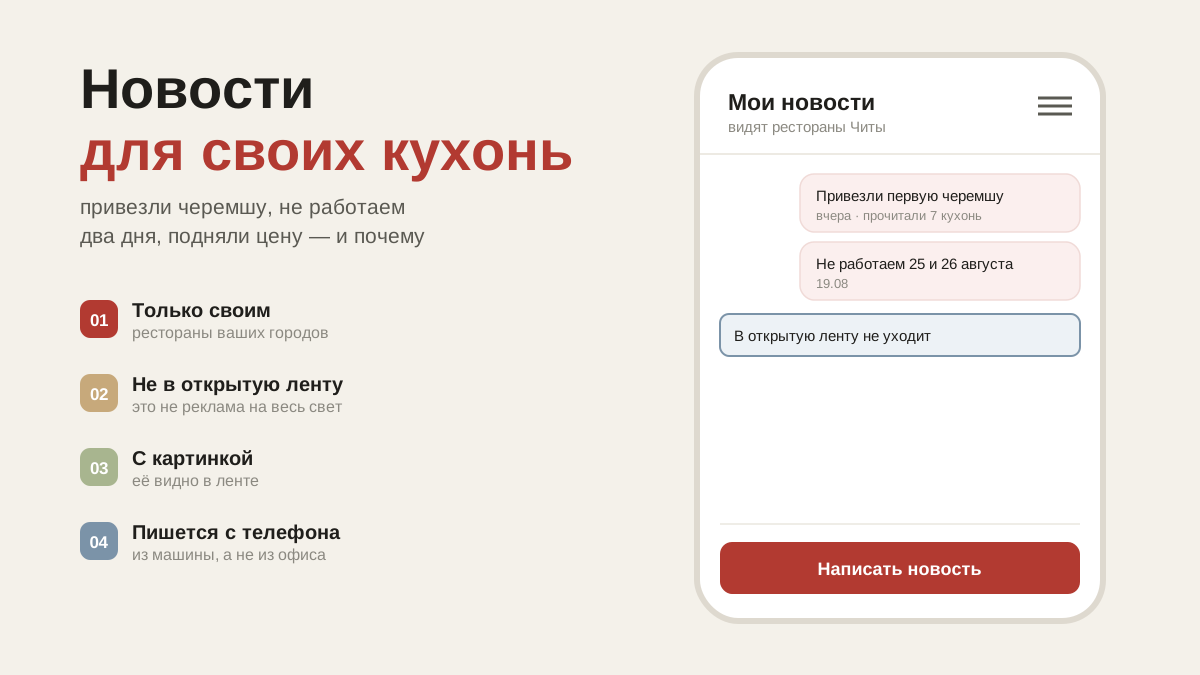
Who sees your news
Your posts are seen by restaurants that have added you to their suppliers. Nobody else sees them — there is no random advertising in kitchen feeds, and that is exactly why posts there get read.
There is one exception: a post about your price list made through "Tell the city" is seen by every kitchen in your city. That is covered in the article about the price list.
How to write one
Menu → "My news" → the pencil icon. It is written like ordinary text: headings, bold and italic, lists, a quote, a link, pictures inside the text and a cover image at the top.
Anything published can be edited or deleted in the same place.
What to write about so that it gets read
A kitchen opens the feed in the morning, between prep and lunch service. What gets read is what changes today's decisions:
- What has arrived and what has run out. "New season carrots are in", "no cherry tomatoes until the end of the week" — that affects the menu directly.
- Price changes. Better to say it yourself than have the chef discover it on the delivery note.
- Changes to delivery. Public holidays, a new delivery day, a change to the order cut-off time.
- The season. "Our own herbs from next week" — a reason to put them on the menu.
What reads badly: long texts about the company, "we've been in the market for twenty years", advertising with nothing specific in it. A kitchen has no time for that.
Common questions
How often to post. When you have something to say. Once a week is fine; three times a day and the feed stops being read.
A kitchen doesn't see my post. Then they haven't added you to their suppliers. How that works is covered in the article about orders from restaurants.